Easy LinkedIn candidate search
Search for potential candidates on LinkedIn straight from the job you're working on, and import the profiles that fit into the same selection process you already use.


When you’ve looked through every CV in your pipeline and the right person still isn’t there, the next step is to look beyond your own candidate pool. For most teams that means a recruiter scouring LinkedIn, putting profiles into a spreadsheet, and manually re-entering the promising ones into the ATS a few hours later.
We’ve built something simpler. Starting this week, Selectify can also search LinkedIn for you, and add the profiles that fit directly to the job you’re working on.
Why search is part of selection
Selectify didn’t start out as a sourcing tool. The product exists to help you select candidates — compare them objectively, ask the right questions, share findings with the hiring team. But we kept hearing the same feedback: the selection tools work well, but the candidate pool is often just too small. You can’t select a great candidate if the people applying simply aren’t the right match.
So we applied the same “selection is a team sport” thinking one step earlier in the funnel. Instead of switching to LinkedIn Recruiter, paying for InMails, and entering candidates one at a time, search now lives inside the job you’re sourcing for — and the output becomes the input for everything else Selectify does.
How the search works
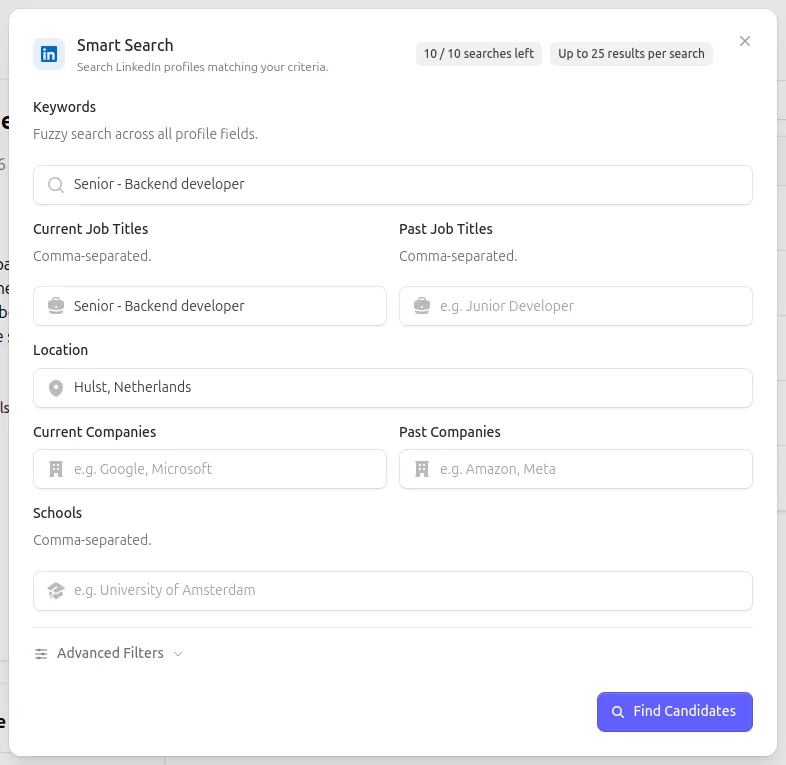
Open a job and click Search on LinkedIn. You get a form that will feel familiar if you’ve ever worked with LinkedIn Recruiter:
- Keywords and job titles — current and past roles.
- Location, Current companies, Education — this helps focus the search.
- Advanced filters — more detailed filters to make the search even more specific.
The job title and location are pre-filled from the job you’re viewing, so the most common flow is “click search, tweak one thing, go”.
What comes back
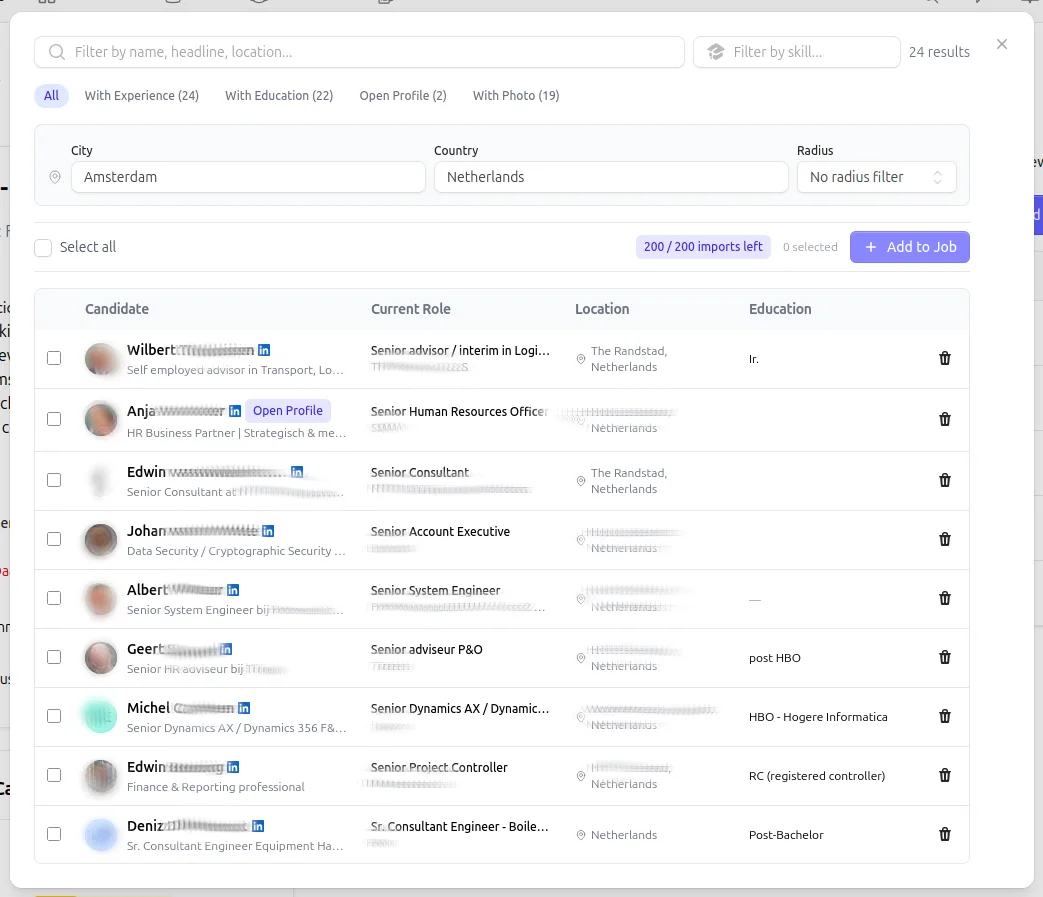
A typical search returns results within 30 to 90 seconds. Once results are in, you see a table of profiles:
- name, current role, location, short bio
- a LinkedIn URL to verify any profile beforehand
- a status per profile: new, imported, or dismissed
You pick the profiles that stand out and click import. Selectify creates the candidate records, attaches them to your job, and pushes them straight into your normal selection flow — the same pipeline, fit scoring, DISC insights, and team review you already use. Duplicates are detected by LinkedIn URL, so importing the same person twice — or finding someone already in your pool — doesn’t cause a conflict but is simply skipped.
Under the hood
A few things we want to be transparent about:
- Quotas. Each subscription has an import allowance per billing period, visible on your subscription page. You don’t pay per search — imports are included in the subscription.
- Privacy. Every imported profile is treated like any other candidate — subject to your team’s GDPR settings, consent flow, and automatic cleanup rules. No separate silo, no separate retention period.
- Runs in the background. Because searches genuinely take time, the UI is built for that. Start a search, do something else, come back later. You’ll get a notification when results are in; meanwhile you can keep reviewing other candidates.