The hiring report: measure a role against the market before you start searching
One report per role: how many people could actually do it, what it has to pay, who else is hiring them — measured, not guessed, and ready to share with whoever asked for the hire.


Every recruiter or hiring manager knows that one brief: lovely on paper, incredibly hard in practice. Think of a senior profile with at least five years’ experience, four days on site, a salary from three years ago — and the expectation that a good shortlist will be ready a week later. The person asking for the hire is often your client, or the manager two doors down. You know it is going to be hard, but saying so without hard numbers quickly feels like an excuse made in advance.
That is why the difficult conversation usually only happens in week six. At the moment the shortlist is painfully thin and the question comes up of how much longer you need to keep slogging. By then it is no longer advice, but pure defence.
With today’s release, we move that conversation to week one. The hiring report measures a role directly against the market and turns that data into a clear page. One clear overview you can share, discuss and adjust straight away with whoever opened the vacancy.
Why we built it this way
The easy route would have been a standard salary benchmark: a static table of national averages, a percentage here and there, and a PDF with a nice logo on it. Managers have seen dozens of those by now. You nod politely and put them aside just as quickly, because there is genuinely nothing in them about this specific role.
Every number in this report is actually measured.
Selectify runs a real, targeted search of the professional network for the specific role. Every combination of requirements is tested directly. Does the report say 140 people match? Then those really are 140 concrete profiles, not an abstract national estimate. And because we run one smart search instead of separate queries per requirement, a report costs only a fraction of traditional market research.
Making choices with visual controls
A vacancy request is a sum of trade-offs, and whoever sets the requirements deserves to see the price of each one straight away. That is why the shared report page is not a dusty document but an interactive set of controls. Move the requirement “four days on site” to two days? Then you immediately see the target group, the market-rate salary and the hiring difficulty move with it on the screen.
This works exactly the same whether you recruit as an agency for external clients or internally for your own organisation. A recruitment agency shares the report with the client; an HR manager shares it with the director. That way, job requirements suddenly become a considered decision you make together, simply with the numbers on the table.
Honest boundaries for now
- Salary data: The salary figures come from the Dutch statistics office (CBS) and currently focus specifically on roles in the Netherlands.
- Scope: Each report covers one specific role at a time.
How it works
Open a campaign and you will see the Hiring report card in the left column straight away. Here you can see at a glance whether the report is ready, still being built, or already shared and opened.
- Build the report: Click Build the first report. It runs in the background and only takes a few minutes; you receive an email as soon as it is ready.
- Define the basics: On The brief tab, choose the official occupation (a job title such as Embedded Software Engineer translates to the CBS occupation category software developers), fill in the salary band and enter the number of hours per week.
- Phrase the trade-offs: On the Report tab, write under each requirement what it brings if you let it go, and what it costs you if you hold on to it. With the Draft them for me button you instantly generate a strong first version that you can refine however you like.
- Check and release: Read the report carefully and click Mark reviewed. Sharing is only possible after this check, because the page states that a person has verified the report.
- Share securely: On the Share tab, set a password, choose an expiry date and create the link. For security, send the link and the password to the recipient through separate channels.
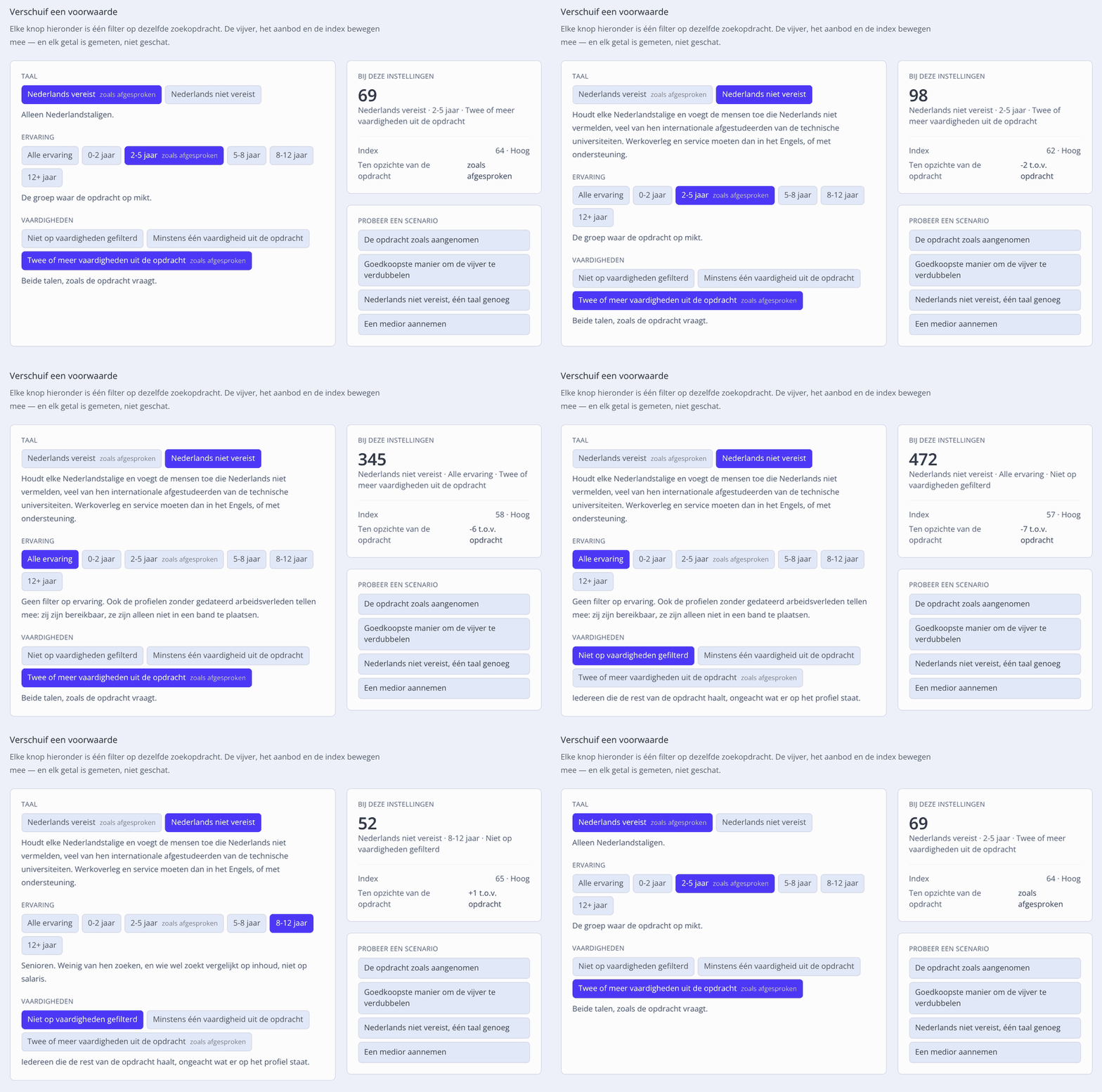
The recipient opens the report page directly in the browser — no account needed, and entirely in your team’s language. The structure is crystal clear: first the market verdict, followed by up to four concrete decisions to make together and the interactive controls. At the bottom it automatically states who prepared the report, taken from your own Settings → Branding → Who we are.
Prefer to attach something tangible? With Download as PDF you turn the same page into a professional A4 document in one click.
Why this matters for you
| Benefit | What it gives you |
|---|---|
| A strong start in week one | You have the difficult conversation about feasibility right at the start. With hard numbers in hand, it is professional advice instead of an excuse. |
| Shared decision-making | The hiring manager or client immediately sees what relaxing a requirement brings, so the choices are made together and deliberately. |
| Insight into your own network | The report immediately shows how many candidates in your own database already match, and which of them have not been approached before. |
| Your personal touch | The report carries your wording, your introduction and your name — Selectify takes care of the data, the calculations and the charts behind the scenes. |
| A transparent model | Your first report is completely free. After that you pay a fixed, affordable price per report. If circumstances mean we cannot build a report, you get your credit back straight away. |
Where to find it
Open a campaign and select the Hiring report card in the left column. Building, checking and sharing reports is available to Team Admins.
No report credits available yet? Click Read an example report on the report page. You then see a fully completed report for a fictional company, with fully working controls, so you see exactly what you will be sharing with your stakeholders. The full documentation is in the manual under Hiring report.