Embedded reporting: ready-to-send PDFs, instant, easy and fast
Compose a template, schedule the delivery, email the PDF. Company reports, client reports and scorecards are now a built-in part of Selectify.

Every HR professional or recruiter knows the drill. A hiring manager or client asks “how’s it going?” and you lose an afternoon assembling a report: pulling numbers together in Excel, writing a few summaries, some commentary in Word, exporting to PDF, emailing it over. The following week the same question lands and you start from scratch.
That cycle is why reporting usually feels like an afterthought. We have the data, but the report — lives in three other apps.
With today’s release, reporting has moved inside Selectify. You build a template, pin it to a job, and it runs on a schedule — straight to the inbox as a PDF.
Why this is in the product, not next to it
We thought hard about the cheap route: a CSV export. Ship a CSV file and let the customer puzzle it out in Excel themselves.
Two things held us back:
- Recruitment reports aren’t tables. A report isn’t “here are 412 rows, figure it out”. It’s a short, narrative document — a cover page, a handful of key metrics, a pipeline breakdown, maybe a shortlist with DISC-driven notes. None of that fits in a CSV, and rebuilding it by hand every week was exactly what made our users miss their deadlines.
- The data already has shape. Selectify already knows which candidates are on a job, what stage they’re in, how long they’ve been there, what their fit score is, what your team thought of them. Every number a report needs is already in the system. Re-exporting it to rebuild it elsewhere is wasted effort.
So we built the report as a built-in feature, alongside the candidate pool and the plan to work it.
How you build a report
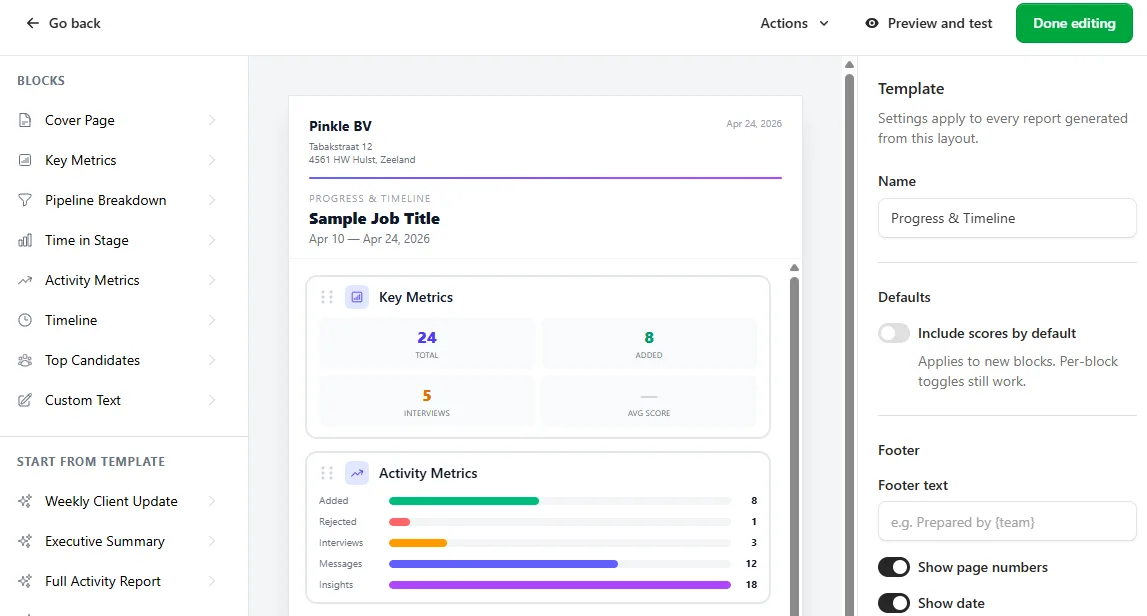
Reports are built from blocks. Each block has its own layout and data — eight of them today:
- Cover page — branding, logo, job title, date range, table of contents.
- Key metrics — totals, additions this period, scheduled interviews, average fit score.
- Pipeline breakdown — candidates per status stage, with a visual bar.
- Time in stage — average number of days active candidates have spent in each stage.
- Activity metrics — added / rejected counts, interviews, messages, analyses completed.
- Timeline — chronological list of interviews and candidate additions.
- Top candidates — shortlisted candidates with scores, strengths and profile summaries.
- Custom text — a freeform block for your own notes, recommendations or disclaimers.
You simply drag the blocks into the order you want, adjust the settings, and save. The result is a reusable template. Five ready-to-use templates are included out of the box — Weekly Client Update, Executive Summary, Full Activity Report, Candidate Shortlist, Progress & Timeline — so you can get started right away!
Scheduling
Once the template is created, you can link it to a job, set a frequency, and specify a list of recipients. The scheduling module supports Outlook-style planning: weekly (including multiple days), biweekly, monthly by day-of-month or nth weekday.
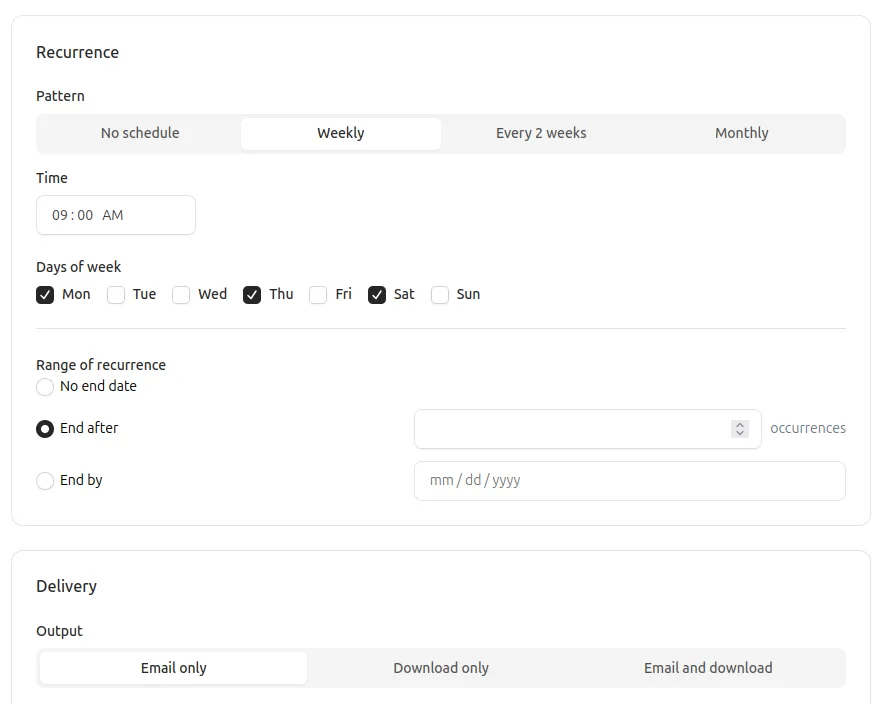
At the scheduled moment the system generates the PDF, and the delivery goes out by email or download-only — depending on the setting. Every generated report is kept — per plan you get a history of when it was sent, to whom, and a link to download the exact PDF the recipient received.
Roadmap
This is our first version. What’s next on the list:
- A widget/block library that users can extend — sections are hard-coded today; in the future we want users to be able to build their own widgets that meet their specific needs.
- Cross-job reports — reports are per-job today. A team-wide report (“every active search, rolled up”) is the logical next step.
- Dashboards alongside PDFs — the same data and widgets, but as an in-app dashboard you can share via a link, without generating a file.
- Direct data integration — for customers who want to integrate with other systems in an external tool.
Where to find reporting
Reporting is available as of today for every team with an active subscription. From the main menu, click Reports. There is a template menu for building templates and then a report menu for creating recurring reports.
Good luck!