Your career page entirely in your own style
Colors, fonts, and a live preview for your career page — customize everything yourself so your career page seamlessly matches your brand identity.


For many applicants, your career page is the first real point of contact with your company — sometimes even before your website. Until now, it looked the same for every team: the same indigo color and the same default font. If you wanted to adjust a color or add your own logo, you had to submit a request and wait for someone to handle it for you.
That is now a thing of the past. You can set up your career page entirely yourself — colors, fonts, and hero style.
Why self-serve, not a default page
We could have opted for a system where every brand identity had to be processed by us. We deliberately chose not to do that. The moment changing a color requires a support ticket, it takes days instead of seconds — and every minor change afterward means yet another ticket.
So now you simply get the controls yourself. Colors are set using color pickers, so a typo can never result in an unreadable color.
How it works: designing your career page
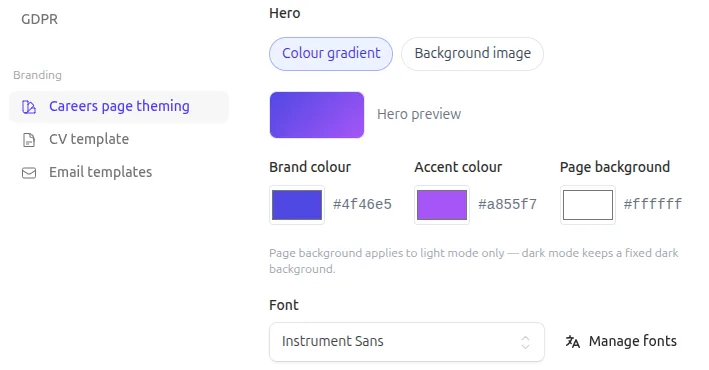
Go to Settings → Career page themes. There you’ll find all the options to tailor the page to your liking:
- Colors: set your brand color, accent color, and page background using color pickers.
- Typography: choose a built-in font or search for your brand font via Customize fonts in Google Fonts.
- Hero section: opt for a sleek color gradient or upload your own brand image.
- Details: add a footer and set up a WhatsApp number as a quick contact button for candidates.
Right next to it is a live preview — not a mockup, but the actual page candidates will see, scaled to fit. Change a color, and the preview updates instantly.
Why this works for you
- Seamless brand experience: no more mismatch between your website and your career page.
- Instant results with live preview: see exactly what candidates see before going live.
- No ticket, no wait time: customizing a color or banner takes seconds, not days.
Get started
- Try it yourself — create an account and post your first job opening for free.
- Prefer a walkthrough? Request a demo.
- Want to switch but not sure how? Email me at darius@getselectify.io.
Selectify is a modern ATS that keeps recruitment simple: from job posting to match, with built-in AI and the recruiter in the driver’s seat. Want to learn more? Check out getselectify.io.
Best of luck!