When a candidate sits too long, Selectify gives you a heads-up
A red exclamation appears only on candidates and jobs that have gone quiet too long — and you deal with them in one click.


You open a job you haven’t looked at in a while. Two candidates have been sitting on Interview for three weeks — nobody rejected them, nobody moved them forward. They just stayed put. And that role you filled last month? It’s still marked Active.
It happens. The admin slips between two interviews, when you’re running four jobs at once, or the week you’re out of office. But the candidate who drops off your radar is exactly the one who takes another offer in the meantime.
With today’s release, Selectify keeps an eye on this for you. The moment a candidate or job sits still too long, you get a nudge — right where you’re already working.
Why we built it this way
We could have made it a report: a “stalled candidates” list you open somewhere and work through. We deliberately didn’t. A notification you have to go and look up is one you forget — especially on a busy day.
So we put the flag where you can’t miss it: right next to the candidate’s status, and the job’s. And only when it matters. Once a candidate or job has been quiet for two weeks, something turns red. Stay inside that line and you see nothing — your overview stays clean.
How it works
There’s nothing to set up. An active job that’s seen nothing for two weeks — no new candidates, no interviews, no notes — gets a small red exclamation next to its status. Click it and choose right away: Mark as filled or Withdraw.
Candidates work the same way. Once a candidate has spent two weeks in the same status, the same exclamation appears next to it, with the buttons Reject and Move to next stage. No need to open the candidate first, so no unnecessary detours.
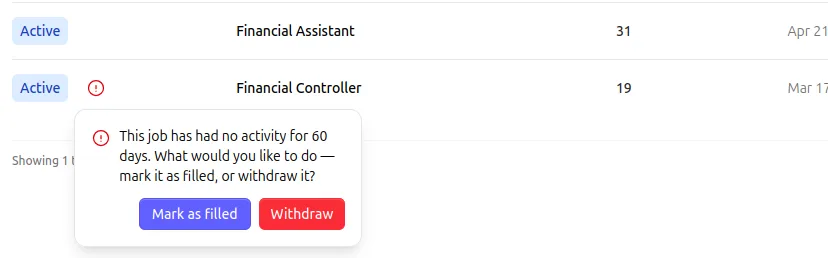
Closing a job that still has candidates in progress? Selectify lets you decide what happens to them in one step: reject them, create a task, or leave them be. Choose to reject with a message, and the rejection email goes out automatically in the right language.
Why this matters for you
- No candidate quietly gathering dust. The people you lose track of are often exactly the ones who need your attention. Selectify taps you on the shoulder before it’s too late.
- One click, no detour. Reject or move a candidate forward straight from the list, without opening the candidate or job first.
- Nothing new to learn. No extra dashboard and no complicated setting. It shows up on its own, right where you’re already looking.
- A tidy overview. The exclamation only appears when something actually needs doing — the rest of the time you just see your regular work.
- The right language, automatically. The rejection email goes out in the right language, so you close candidates off neatly and professionally.
Where to find it
The exclamations appear on their own: on the candidate in your pipeline, on the job page, and in your jobs overview. They’re visible to team admins, who can change the status directly. There’s nothing to switch on.
Curious how the statuses work exactly? See the manual under Candidates and Jobs — or just open a job and see if something red is waiting for you.